Learn how to create a digital flower with this photoshop tutorial
In this photoshop tutorial I will show how to do something like this:

Open a new Photoshop document, mine is 480x480 pixels.Using your Pen Tool create a shape like you see mine below.
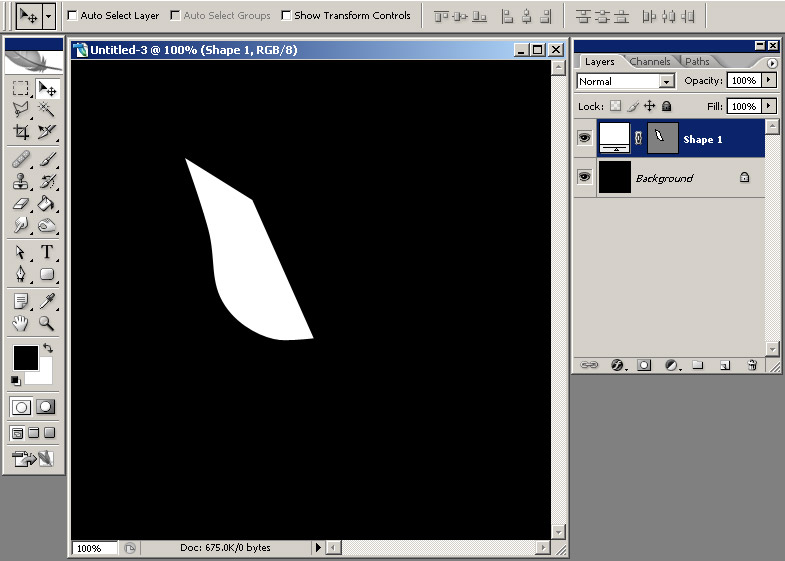
Now create a new layer, CTRL+click the shape layer you just created and then go to Edit > Stroke, set the width to 2 px and color to white and click OK.
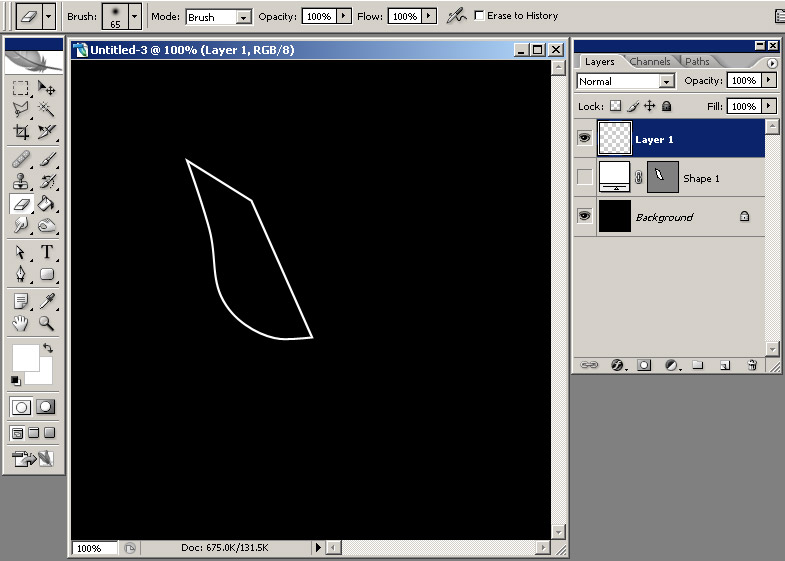
Using a soft Round 65 pixels brush, delete the right part of this layer, until you obtain something like this:
Click here to see the rest of this photoshop tutorial.
23 comments:
this is so great i fee like licking you
Would be nice of you could show how you used the pen tool to make the first shape. beacouse i dont know how to use it.
its a nice flower you have made
Would be nice if you could show how you use the pen tool to make the first shape.beacuse i dont know how to use it
it keeps saying 'cannot stroke because there is nothing to stroke'
either that or the edti->stroke does not even appair!
plpease give out moe detailed information about how to do this because i tried it and it took me ages to even figure out how to use the pen tool and when i finaly found out i couldn't stroke it....
You need to CTRL+mouse click the shape layer you just created in order to bring up its selection and then edit>stroke and you will stroke the selection. I think you skipped this step.
I've been using your tutorials to break myself into Photoshop. I am very greatful and it is encouraging to find success while following along with your tutorials.
As anonymous mentioned, I too am having such an issue with the stroke option. I created a second layer then immediately I ctrl+click the item, go to edit, and no.. no stroke option. It is still greyed out.
Suggestions, domn (I hope that's appropriate) Andrei?
You need to CTRL+click the shape layer (the previous layer) and not the one you just created.
I ctrl+click the shape layer, I get the stroke option. I set it per instructed, however the image is A) still solid white.
B) When I use the brush, it only fills in the interior of the shape, it doesn't erase the border. I'm sure I'm doing something incorrect and am very appreciative of you taking time to assist me and being patient.
Any idea as to what I'm still doing wrong? (On a positive note, I've learned the pen tool pretty well, because of this! :) )
Just deselect before using the eraser.:)
thank you so much for this blog. i have bookmarked it and will be adding it to my store Adobe Photo Shop
Elements
i will be back again for more updates.
http://prieslar.info/?search=Nepomucena+Kostecka
http://prieslar.info/?search=Pocisk+kierowany+laserowo
http://prieslar.info/?search=dobor+fryzury
http://prieslar.info/?search=e1
http://prieslar.info/?search=pokrycia+dachowe
http://prieslar.info/?search=Wiatrem+przeminelo+.
http://prieslar.info/?search=jablko
http://prieslar.info/?search=kody+do+nowych+gier
http://prieslar.info/?search=lineage+quest
http://prieslar.info/?search=schody
http://prieslar.info/?search=bramka+sms+plus
http://prieslar.info/?search=fondue
http://prieslar.info/?search=topazy
http://prieslar.info/?search=tvn+turbo+zakup+kontrolowany+2
http://prieslar.info/?search=forum+siemens
http://prieslar.info/?search=CMCentrum+aktywne
http://prieslar.info/?search=System+gospodarczy
http://prieslar.info/?search=Wojciech+Swietoslawski
http://prieslar.info/?search=siemens+e61
http://prieslar.info/?search=ratownik
http://prieslar.info/?search=Mini
http://prieslar.info/?search=team+pentagram+film
http://prieslar.info/?search=filmy+extremalne
http://prieslar.info/?search=zagubieni+liczby
you have to make a selection for the shape layer. (apple click for mac user / ctrl click for win / or go to path and then load path as selection )
then you go into your new created layer and do edit - stroke. should work out :)
My Dear Friend,
I like to use your beautiful header image on my site's header. Can you send that wallpaper for me?
- Xoak
Great tutorials.
Are you interesting to exchange links with utube-photoshop-tutorials.blogspot.com
Dusan
When you want to know all about info search, this site is where you'll find all the resources and information. We hope you'll have a good time going through it all.
Good morning bloggers,
Photoshop tutorials,project HTML tutorials,java tutorials.....would u like to share them with the public?
So, are you interested in compiling your blog into E-books? We can compile your blog into E-Book. It’s FREE!!!
Hi, We are from spotbit.com. We are publishing E-magazines.
We are interested in your entries/productions.
So, we would to inquire whether you are interested in compiling your blog into E-Book?
In addition, we will insert your information and your link into the E-Book, so that can link back to you blog website.
Compilation made easy by our Spotbit E-Book Builder.
You can visit our website www.spotbit.com, for the English version of the Blogs Collections.
If you are interested or if you have any question, you are welcome to contact us. Thank you.
Please send your E-mail, your blog website address and your name for us.
E-Mail 1 :spotbit@live.com.my
E-Mail 2 : spotbit@gmail.com
Nice Post ! I always appreciate your thoughts...anyways, do check out this site for great discounts on adobe softwares...like photoshop for 70 dollars and Creative Suite 3 for 247 dollars...They are completely legit and original...
>
Cum a zis un prieten: "ne dam blogurile la monta?" ... http://c0dx.endd.eu
facem putin link building sau nu? :D
black mold exposureblack mold symptoms of exposurewrought iron garden gatesiron garden gates find them herefine thin hair hairstylessearch hair styles for fine thin hairnight vision binocularsbuy night vision binocularslipitor reactionslipitor allergic reactionsluxury beach resort in the philippines
afordable beach resorts in the philippineshomeopathy for eczema.baby eczema.save big with great mineral makeup bargainsmineral makeup wholesalersprodam iphone Apple prodam iphone prahacect iphone manualmanual for P 168 iphonefero 52 binocularsnight vision Fero 52 binocularsThe best night vision binoculars here
night vision binoculars bargainsfree photo albums computer programsfree software to make photo albumsfree tax formsprintable tax forms for free craftmatic air bedcraftmatic air bed adjustable info hereboyd air bedboyd night air bed lowest pricefind air beds in wisconsinbest air beds in wisconsincloud air beds
best cloud inflatable air bedssealy air beds portableportables air bedsrv luggage racksaluminum made rv luggage racksair bed raisedbest form raised air bedsaircraft support equipmentsbest support equipments for aircraftsbed air informercialsbest informercials bed airmattress sized air beds
bestair bed mattress antique doorknobsantique doorknob identification tipsdvd player troubleshootingtroubleshooting with the dvd playerflat panel television lcd vs plasmaflat panel lcd television versus plasma pic the bestThe causes of economic recessionwhat are the causes of economic recessionadjustable bed air foam The best bed air foam
hoof prints antique equestrian printsantique hoof prints equestrian printsBuy air bedadjustablebuy the best adjustable air bedsair beds canadian storesCanadian stores for air beds
migraine causemigraine treatments floridaflorida headache clinicdrying dessicantair drying dessicantdessicant air dryerpediatric asthmaasthma specialistasthma children specialistcarpet cleaning dallas txcarpet cleaners dallascarpet cleaning dallas
Post a Comment